How to open a GAEB file (.x83, .d83) without special software
A .x83 or .d83 file arrived and nothing on your machine opens it. Four ways to read a GAEB tender, from a text editor to a free browser check, what each one shows you, and how to read the report.
A general contractor sends you a tender as Ausschreibung.x83. Windows shrugs, your mail client offers to search the store, and the deadline is in nine days. This post explains what the file is, the four realistic ways to read it, and, for the one that needs nothing installed, what the report tells you and how to act on it.
What a .x83 file is
The extension tells you two things. X means GAEB DA XML, the current generation of the German GAEB exchange format. 83 is the exchange phase: a call for tenders, the bill of quantities (Leistungsverzeichnis) you are asked to price. A .x84 would be a bid, a .x86 the awarded contract. Inside, the file is plain XML: a header with project and client, lots and titles, and one element per position with its number, short text, long text, quantity and unit. Prices are deliberately absent in an X83; adding them is your job.
The older cousins .d83 (GAEB 90) and .p83 (GAEB 2000) are fixed-width text files, not XML. They look like a wall of numbers and need a real parser. If you receive one, ask the sender for the DA XML export; every current estimating tool can produce it. The format guide has the full family tree.
Option 1: a text editor
Because DA XML is text, any editor opens it. You will see the project name near the top and, if you scroll, elements such as <ShortText> and <Qty>. This is enough to confirm what the file is and roughly how big it is. It is not enough to read the tender: long texts are wrapped in HTML inside CDATA blocks, quantities sit far from their units, and a 400-position bill is a few thousand lines.
Option 2: the sender's PDF
Most clients will send a PDF of the same bill on request. You can read it, but the structure is gone: no machine-readable position numbers, no quantities you can copy, and no way to hand a priced X84 back. For anything beyond a first look, you end up retyping.
Option 3: a vendor viewer
The large estimating suites and some GAEB consultancies offer free viewers. They show the bill properly but come with the usual conditions: a Windows installer, often a registration, sometimes a licence that expires. Fine if you already work in that ecosystem, a detour if you do not.
Option 4: a free check in the browser
GAEB-Check is our free browser tool. Open the page, drop the file onto the card (or pick it from disk) and press "Check file". A few seconds later you get a report. Nothing is installed and nothing is stored: the file is parsed in memory by a function in Frankfurt, using our open-source library pyGAEB, and discarded with the response. The examples below come from the sample tender on the page, a synthetic school extension with 22 positions; press "Try the sample tender" to reproduce them.
The verdict
The report opens with a verdict: what the file is, and five checks with a green, blue, orange or red mark. Each check says what it found and what to do about it.
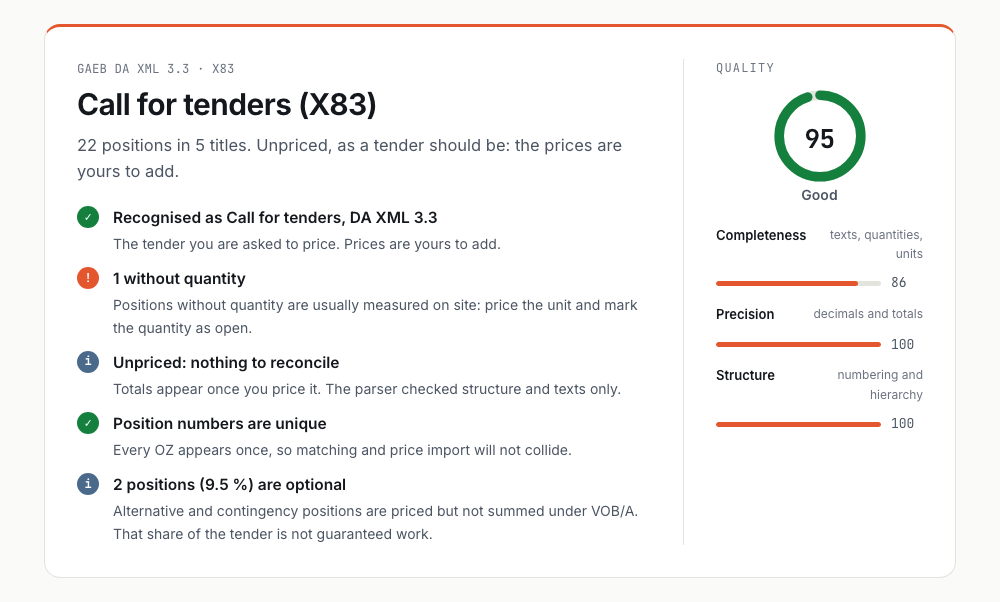
For the sample: it is a call for tenders in DA XML 3.3 with 22 positions in 5 titles. One position has no quantity, which usually means it is measured on site, so you price the unit and mark the quantity as open. Position numbers are unique, so a price import later will not collide. Two positions are alternative or contingency: priced, but not counted toward the total under VOB/A, so that share of the tender is not guaranteed work. The quality score on the right rates the file, not the project: completeness of texts, quantities and units, precision of decimals and totals, and soundness of the numbering.
The structure, with every position
Then comes the bill itself: each title with its positions, number, short text, quantity, unit and type. Bars show each title's share of the positions, or of the money when the file is priced. Alternative and contingency positions carry a "not summed" marker on the row.
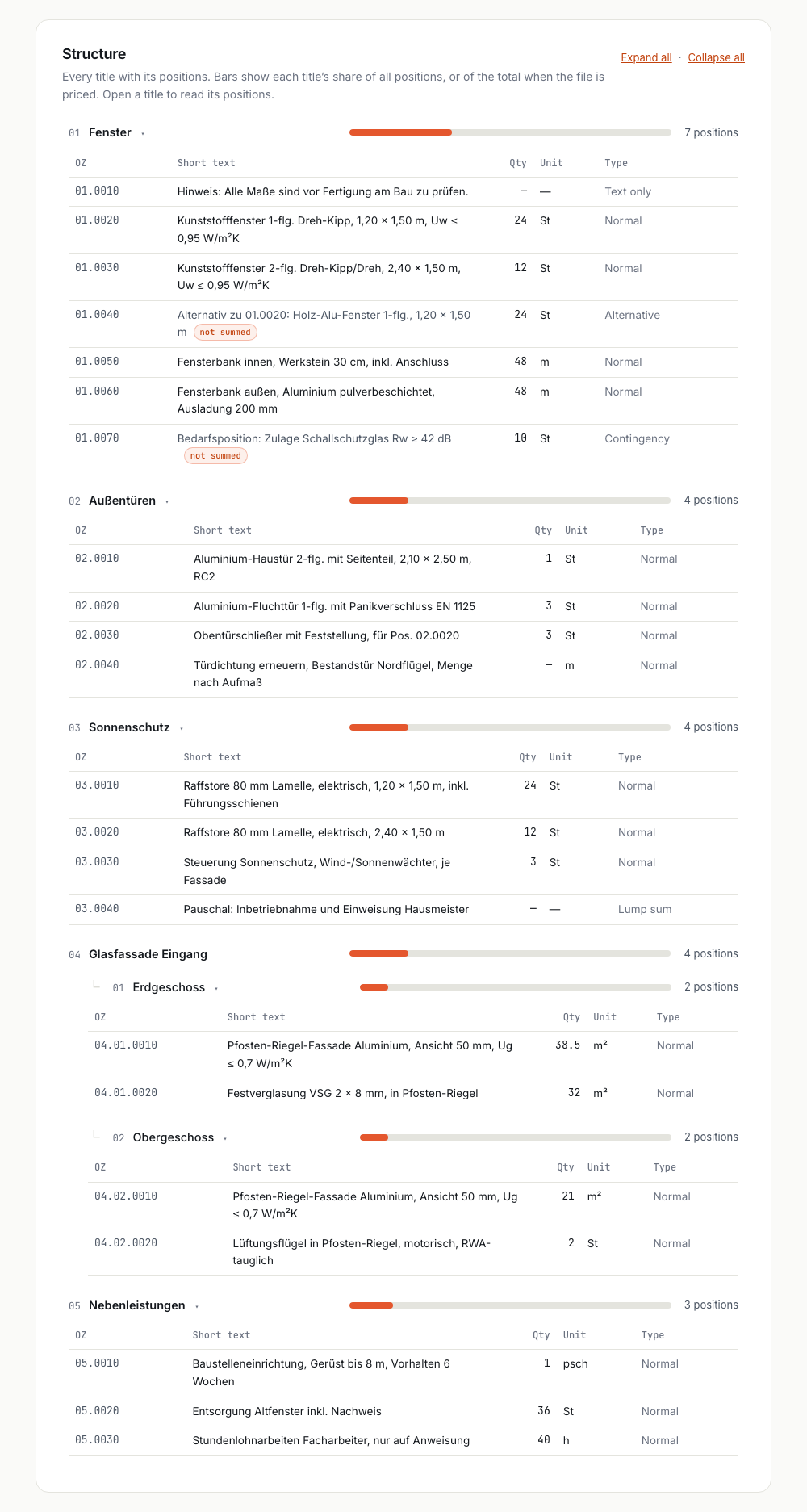
In the sample, the five titles are:
| Title | Positions | What is in it |
|---|---|---|
| 01 Fenster (windows) | 7 | Plastic windows, an alternative in wood-aluminium, sills inside and out, a contingency for acoustic glazing |
| 02 Außentüren (exterior doors) | 4 | Entrance door, escape doors, door closers, a seal renewal measured on site |
| 03 Sonnenschutz (sun protection) | 4 | Exterior blinds, a controller, a lump sum for commissioning |
| 04 Glasfassade Eingang (entrance facade) | 4 | A post-and-beam facade split into ground and upper floor |
| 05 Nebenleistungen (ancillary works) | 3 | Site setup and scaffolding, disposal of old windows, hourly work |
That is the reading an estimator needs before deciding whether to bid at all: how much is real work, how much is optional, and which titles carry the volume.
The findings
The last section groups everything the parser flagged by kind, with a plain-language explanation and the affected positions. For the sample there is exactly one: the door seal position without a quantity.
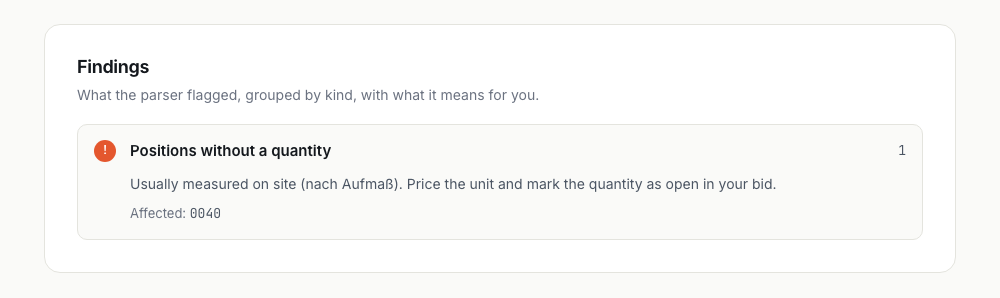
For real files the same section reports duplicate position numbers, missing short texts, missing unit prices in a bid, subtotals that do not match their positions, and totals that do not match the recomputed sum. Each is something to raise with the sender before you price, or to fix before you submit.
Keeping the report
Below the report you can save it as a PDF, through your browser's print dialog, or send the tender into a pilot with us. Both ask for a work email; the file itself never leaves your machine a second time. The check is limited to ten files per hour per connection, and the page tells you how long to wait if you hit that.
For developers: read it in Python
If you need the data rather than a view of it, pip install pyGAEB gives you the same parser that powers the check. Three lines get you every position with decimal-precise quantities, and the library also writes X84 bids, diffs versions and converts between phases. The Python guide walks through it.
Which to choose
For a quick look at a file you just received, use the browser check. For pricing, use whatever estimating tool you already own, or ask us about a pilot if that tool is a spreadsheet. For automation, use pyGAEB. And whichever you choose, if a .d83 arrives, ask for the .x83.
Was this article helpful?
No cookies, no tracking — one vote per reader per day.
Comments
Comments are reviewed before they appear.
Loading comments…